
Your desk is supposed to be a productive workspace where you get things done. Instead, it’s probably buried under scattered papers, tangled cables, random pens that don’t work, sticky notes everywhere, and about seventeen coffee mugs you forgot to take back to the kitchen.
I’ve been there. Working from home seemed like a dream until I realized my “home office” was just a cluttered corner where I constantly lost important documents, wasted time searching for supplies, and felt stressed before even starting work. My productivity suffered, my motivation tanked, and I dreaded sitting down at my desk each morning.
The breaking point came when I missed a critical deadline because I couldn’t find a signed contract buried somewhere in the paper chaos. That’s when I committed to actually organizing my workspace instead of just shuffling the clutter around.
After testing dozens of desk organizers (some brilliant, many worthless), I’ve identified the six products that genuinely transformed my home office from chaotic disaster to productive workspace. These aren’t just containers to hide clutter – they’re functional systems that keep everything accessible, visible, and organized with minimal daily effort.
Why Desk Organization Directly Impacts Productivity
Before you think “I’ll organize later,” consider what a properly organized desk delivers:
- Increased Focus: Clutter is scientifically proven to reduce concentration and cognitive performance
- Time Savings: Stop wasting 20+ minutes daily searching for documents, pens, and supplies
- Professional Appearance: Video calls and clients see your workspace – make it look intentional
- Reduced Stress: Visual clutter creates mental stress and anxiety
- Better Work-Life Balance: An organized workspace helps you “leave work” mentally at end of day
- Improved Creativity: Clear space literally creates mental space for thinking
What Makes an Effective Desk Organizer
When shopping for desk organization products, look for these features:
- Accessibility: Frequently-used items should be within arm’s reach
- Visibility: You should see what you have without digging through drawers
- Space Efficiency: Maximizes vertical space, minimizes desktop footprint
- Quality Materials: Cheap organizers fall apart quickly and look unprofessional
- Aesthetic Cohesion: Organizers should look intentional, not like random containers
Now let’s look at the desk organizers that actually work!
1. Best Desk Organizer: Marbrasse Wooden Desk Organizer

- ✔ Stable & Sturdy: Made of Eco-friendly density board materials,sturdy construct,safe and nontoxic. comes with a bag of …
- ✔ Easy to Assemble: This Desktop organizer needs to be assembled By Yourself, it’s full of the joy when you assemble the…
- ✔ Ultra-Capacity: The desk organizer measures 20.6 x 15 x 26.7 cm / 8.11″ x 5.9″ x 10.51″, it has 9 tilt compartment slo…
Why This Is the Foundation of Desk Organization: This isn’t just a pen holder – it’s a complete desktop organization system. Multiple compartments keep everything from pens and scissors to sticky notes and business cards organized and accessible. The wooden construction looks professional enough for video calls.
Key Features:
- Natural wood construction (bamboo/walnut options)
- 9+ compartments of various sizes
- Detachable drawer for small items
- Phone/tablet stand slot
- Business card holder
- Pen holder sections
- Sticky note compartment
- Assembles in minutes
- Dimensions: 9.8″ x 5.9″ x 4.1″
What You Can Organize:
- Pens, pencils, and markers
- Scissors and letter opener
- Sticky notes and notepads
- Business cards
- Paper clips and binder clips
- USB drives and SD cards
- Charging cables (when not in use)
- Phone or small tablet (while working)
Best For: Anyone who wants a complete desktop organization system in one product
Price Range: $25-$40
My Experience: This wooden desk organizer was the first thing I bought for my home office, and it’s been the foundation of my entire organizational system. Before, I had pens scattered everywhere, sticky notes in random piles, and business cards stuffed in drawers. Now everything has a designated spot within arm’s reach. The wooden construction looks significantly more professional than plastic organizers – important for video calls where clients see my background. Assembly took about 15 minutes and required no tools (pieces fit together like a puzzle). The compartments are thoughtfully sized – tall sections for pens, shallow sections for clips and small items, the perfect slot for sticky note pads. The detachable drawer is brilliant for items I use occasionally but need accessible (staples, extra paper clips, USB drives). The phone stand slot holds my phone at perfect viewing angle for quick reference during calls. After three years of daily use, the wood still looks great (I wipe it down monthly). This organizer eliminated probably 70% of my desktop clutter in one purchase.
Pro Tip: Place this organizer on your dominant hand side for easiest access. Keep only items you use daily in the compartments – everything else goes in drawers. The drawer is perfect for small items you need occasionally but would otherwise lose. Clean compartments monthly to prevent dust buildup.
What to Search on Amazon: Look for “Marbrasse wooden desk organizer” or “bamboo desk organizer with drawers.” Available in natural wood, walnut, and black finishes.
2. Best Cable Management: JOTO Cable Management Sleeve (4-Pack)

- Set of 4, each 19 – 20″ long. Flexible neoprene cable sleeve with zip-up solution manages and conceals cables while prov…
- Form-fitting neoprene stretchy material allows for multiple cables and flexibility (each sleeve can hold up to 8-10 cabl…
- Easy to use, just gather cables together, wrap the sleeve around and zip-up, perfect for home and office use
Why Cable Chaos Ruins Desk Aesthetics: Tangled cables under your desk look unprofessional, collect dust, and make it impossible to identify which cord belongs to which device. Cable management sleeves bundle all cords into one neat tube, transforming cable chaos into a clean, organized look.
Key Features:
- 4-pack of cable sleeves
- Each sleeve: 19.5″ long, expandable diameter
- Neoprene material (flexible and durable)
- Zipper design for easy cable insertion/removal
- Accommodates multiple cables in one sleeve
- Black color blends with most setups
- Cable clips included
- Protects cables from pet damage
What You Can Organize:
- Computer power cables
- Monitor cables
- Keyboard and mouse cables (if wired)
- Phone charging cables
- Lamp cords
- Speaker wires
- External hard drive cables
- Any desk-related cables
Best For: Anyone with visible cable clutter under or behind their desk
Price Range: $12-$20 for 4-pack
My Experience: Before buying cable sleeves, the underside of my desk looked like a tangled nest of cables. I had computer power, monitor cables, lamp cord, phone charger, and speaker wires all jumbled together. Moving anything meant untangling cables, and the visual clutter was distracting. These cable sleeves completely solved the problem. The zipper design is genius – you unzip the sleeve, insert cables, and zip it back up. I used one sleeve for all my computer-related cables (power, monitor, keyboard, mouse), one for charging cables, and one for my lamp and speakers. The neoprene material is flexible enough to route around furniture but rigid enough to keep shape. The sleeves blend visually into my black desk setup. Installation took about 30 minutes total – gather cables, insert into sleeves, use the included clips to route sleeves along desk legs or walls. The difference is dramatic – my desk setup went from looking amateur and messy to clean and professional. Bonus benefit: my cat stopped chewing cables because they’re protected inside the sleeves.
Pro Tip: Bundle cables by function (computer, charging, peripherals) rather than putting all cables in one sleeve. This makes troubleshooting easier. Use cable clips to secure sleeves to desk legs or walls for cleanest look. Label each sleeve with a label maker so you know which cables are inside.
What to Search on Amazon: Search “JOTO cable management sleeve” or “cable organizer zipper sleeve.” Available in various lengths and colors (black, white, gray).
3. Best File Organization: SimpleHouseware Desktop Document Letter Tray Organizer

- Vertical Sections for File Storage – Upright compartments keep folders and file holders neatly arranged and easy to acce…
- Horizontal Letter Trays – Offers space for storing folders, notebooks, scissors, staplers, and other desk accessories.
- Drawer with Adjustable Compartments – Includes three sections and six movable dividers for organizing pens, markers, and…
Why Paper Chaos Kills Productivity: Loose papers on your desk create visual clutter and make finding important documents impossible. This vertical file organizer keeps documents sorted, visible, and accessible while minimizing desktop footprint.
Key Features:
- 5 vertical filing sections
- 1 sliding drawer for small items
- Metal mesh construction
- Vertical orientation saves desk space
- Sections accommodate letter-size documents
- Sturdy construction (doesn’t tip)
- Black finish matches most office setups
- Dimensions: 13.4″ x 9.4″ x 12.6″
What You Can Organize:
- Current projects (separate section per project)
- To-do documents
- Bills to pay
- Documents to file
- Reference materials
- Notebooks and notepads
- Folders and binders (thin ones)
- Mail and correspondence
Best For: Anyone dealing with paper documents that pile up on desk surfaces
Price Range: $18-$28
My Experience: This file organizer transformed how I handle paper documents. Before, papers were stacked horizontally in messy piles where I couldn’t see what I had. Important documents got buried and forgotten. Now I have five vertical sections organized by category: current projects, to-file, bills, reference, and correspondence. The vertical orientation means I can see the edge of every document, making finding specific papers instant. The sections are wide enough for folders and thin binders, not just loose papers. The sliding drawer at the bottom is perfect for small items like stamps, paper clips, and business card stacks. The mesh construction looks professional enough for client video calls. The organizer is surprisingly stable – it doesn’t tip even when sections are unevenly loaded. I keep this on my desk’s left side (non-dominant hand) so it’s accessible but doesn’t interfere with primary workspace. After two years of daily use, the mesh shows no rust or damage.
Pro Tip: Label each section so you know what belongs where (use a label maker or tape and marker). Sort documents immediately when they arrive rather than creating “to-sort” piles. Keep the front section for most urgent items. Empty the “to-file” section weekly to prevent overflow.
What to Search on Amazon: Look for “SimpleHouseware mesh desk organizer sliding drawer” or “vertical file organizer with drawer.” Available in black and silver finishes.
4. Best Monitor Stand: HUANUO Adjustable Monitor Stand with Storage
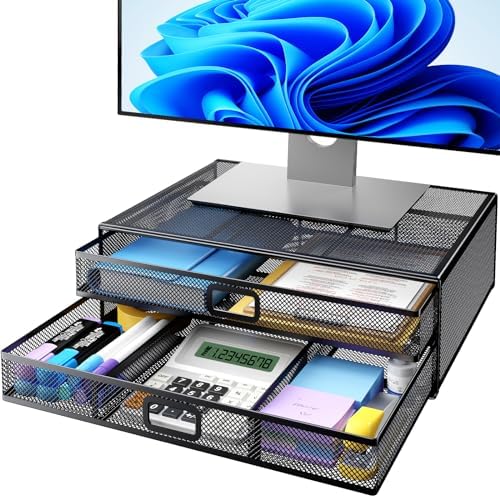
- 【Sturdy Desk Stand with Strengthened Construction】- The “H” shape construction increases the duration. This monitor stan…
- 【Ergonomic Monitor Stand Riser】- Raise your monitor by 4.61″, helping you to keep a good sitting posture and prevent the…
- 【Super Monitor Stand with 2 Drawers】- Store almost all of your small office supplies like pens, notebooks, smart phones,…
Why Monitor Stands Create Usable Space: Your monitor sitting directly on your desk wastes valuable surface area underneath. A monitor stand raises your screen to proper ergonomic height while creating storage space below for keyboard, notebooks, or office supplies.
Key Features:
- Adjustable height (3 positions)
- Sturdy metal construction
- Storage shelf underneath monitor
- Holds up to 44 lbs
- Ventilated design for heat dissipation
- Phone/tablet holder slot
- Built-in cable management holes
- Dimensions: 15.4″ x 8.7″ x adjustable height
What You Can Store Underneath:
- Wireless keyboard (when not in use)
- Notebooks and notepads
- Small desk organizers
- External hard drives
- USB hubs
- Desk phone
- Coffee mug (careful with spills!)
Best For: Anyone wanting to maximize desk space and improve monitor ergonomics
Price Range: $25-$40
My Experience: This monitor stand serves dual purposes: better ergonomics and more desk space. Before, my monitor sat directly on the desk, forcing me to look down slightly (bad for neck posture) and wasting the entire area underneath. Now my monitor is at perfect eye level, and the space underneath holds my wireless keyboard when I’m not typing, plus a small notebook and pen holder. The three-position height adjustment lets me fine-tune the monitor height precisely. The metal construction is rock-solid – no wobbling or flexing even when I accidentally bump my desk. The ventilated design allows heat from my laptop (when used as a second screen) to dissipate. The phone/tablet slot on the side holds my phone at perfect viewing angle for reference during work. The cable management holes let me route cables cleanly. Assembly took 5 minutes with the included Allen wrench. My desk feels significantly more spacious, and my neck pain from looking down at my monitor has disappeared.
Pro Tip: Adjust height so your monitor’s top edge is at or slightly below eye level. Use the space underneath for items you need accessible but not constantly in hand. The phone slot is perfect for keeping your phone visible but not distractingly close. Wipe down weekly to prevent dust buildup in the ventilation holes.
What to Search on Amazon: Search “HUANUO adjustable monitor stand” or “monitor riser with storage organizer.” Available in black and other colors.
5. Best Drawer Organizers: STORi Clear Plastic Drawer Organizers (15-Pack)

- ✔Make Everything Organized — These clear versatile drawer dividers trays are perfect for any place in your home. Fit al…
- ✔Combination of 4 Different Sizes — One set includes 25pcs storage bins in 4 different sizes, which help you customize …
- ✔Non-Slip and Durable — Extra 100pcs silicone pads are included, just stick them on the bottom of the plastic trays for…
Why Desk Drawers Become Junk Drawers: Without dividers, desk drawers devolve into chaotic junk drawers where pens, scissors, sticky notes, chargers, and random items create an unusable mess. Clear organizers create designated spaces for everything.
Key Features:
- 15-piece set (multiple sizes)
- Clear plastic for visibility
- BPA-free shatterproof construction
- Non-slip grip bottom
- Various sizes fit different items
- Stackable in deep drawers
- Easy to clean
- Modular design
What You Can Organize:
- Pens, pencils, and markers (separated by type)
- Scissors, staplers, and tape
- Sticky notes and notepads
- Binder clips and paper clips
- USB drives and SD cards
- Charging cables
- Batteries
- Calculator and ruler
- Business cards
Best For: Anyone whose desk drawers are disorganized messes
Price Range: $20-$35 for 15-piece set
My Experience: These drawer organizers transformed my desk drawers from unusable junk storage to functional organization systems. I have two desk drawers – one shallow (top) and one deep (bottom). In the top drawer, I used multiple organizers to separate pens by type (ballpoint, gel, Sharpies), pencils, highlighters, scissors, tape, and paper clips. In the bottom drawer, I organized charging cables, batteries, USB drives, notepads, and miscellaneous supplies. The clear plastic means I can see what’s in each organizer at a glance – no more digging. The 15-piece set includes enough variety that I could customize both drawers perfectly. The non-slip bottoms work well – organizers stay in place when opening and closing drawers. The clear plastic hasn’t yellowed or clouded after two years of use. Being able to find exactly what I need in seconds instead of digging through drawer chaos has genuinely improved my work efficiency. I can now close my drawers properly because items aren’t piled on top of each other.
Pro Tip: Empty drawers completely before organizing. Group similar items together to determine which organizer sizes you need. The smallest organizers are perfect for paper clips and tiny items. Leave some organizers empty for future purchases. Clean organizers quarterly by removing and washing.
What to Search on Amazon: Look for “STORi clear plastic drawer organizers” or “clear drawer organizer set 15 piece.” Available in various sizes.
6. Best Desk Lamp with Wireless Charging: TaoTronics LED Desk Lamp with USB Charging Port

- 10W Wireless Charging and USB Charging: The upgraded dimmable desk lamp has 10W fast wireless charging and USB charging …
- 50 Lighting Choices and Touch Control: 5 lighting modes X 10 levels of brightness, there are 50 lighting options in tota…
- Eye Protection: Eye care diffused non-flickering Lighting. With 60 full-spectrum led beads and afrosted shade, it cast a…
Why Lighting and Charging Matter: Proper desk lighting reduces eye strain and improves focus. A lamp with integrated wireless charging and USB ports eliminates cable clutter while keeping your phone and devices charged and accessible.
Key Features:
- LED desk lamp with multiple brightness levels
- Multiple color temperature modes (warm to cool)
- Qi wireless charging pad built into base
- USB charging port
- Touch controls
- Adjustable arm and head
- Memory function (remembers your settings)
- Eye-care LED (no flicker, no glare)
- Modern design
What It Provides:
- Adjustable task lighting
- Wireless phone charging (Qi-compatible)
- USB port for charging devices
- Reduced cable clutter
- Improved focus and reduced eye strain
- Professional appearance for video calls
Best For: Anyone who needs better desk lighting and wants to eliminate charging cable clutter
Price Range: $35-$55
My Experience: This lamp solved multiple problems simultaneously. First, my previous lamp was dim and created glare on my computer screen, causing eye strain by mid-afternoon. This LED lamp has multiple brightness levels and color temperatures, so I can adjust lighting based on time of day and task (cool white for focused work, warm for evening). The adjustable arm lets me direct light exactly where needed. Second, I was constantly searching for charging cables for my phone. Now I just set my phone on the lamp base and it charges wirelessly – no cables needed. The USB port charges my wireless earbuds or smartwatch. The touch controls are intuitive and the memory function means the lamp turns on at my preferred settings. The modern design looks professional enough for video call backgrounds. After 18 months of daily use (8+ hours per day), the LED shows no dimming or degradation. My eye strain has noticeably decreased, and my desk looks cleaner without charging cables everywhere.
Pro Tip: Position the lamp to your non-dominant side to avoid shadows when writing. Use cool white light (5000K+) for focused work and warm white (3000K) for less intense tasks or evening. Clean the wireless charging pad monthly with a slightly damp cloth to ensure efficient charging.
What to Search on Amazon: Search “TaoTronics LED desk lamp wireless charging” or “desk lamp with wireless charger USB.” Available in black and white finishes.
Complete Home Office Desk Organization System
Here’s how these six products work together to create a fully functional workspace:
Desktop Surface: Wooden desk organizer keeps daily supplies accessible and organized
Under Desk: Cable management sleeves eliminate visual cable chaos
Desktop Vertical: File organizer keeps documents sorted and visible while minimizing footprint
Desktop Raised: Monitor stand creates ergonomic viewing height and storage space underneath
Drawer Organization: Clear organizers create designated spaces for all supplies
Lighting & Charging: Desk lamp provides adjustable lighting and device charging without cable clutter
Result: A desk where everything has a place, nothing is cluttered, and productivity flows naturally.
How to Organize Your Home Office Desk: Step-by-Step
Don’t just buy organizers and hope for improvement. Follow this systematic approach:
Step 1: Complete Desk Emptying (30 minutes) Remove everything from your desk, drawers, and surrounding area. Everything.
Step 2: Deep Clean (20 minutes) Wipe down all surfaces, vacuum under desk, clean drawer interiors. Start fresh.
Step 3: Sort Everything (45 minutes) Create piles:
- Keep (use regularly)
- Relocate (belongs elsewhere in home)
- Donate/Sell
- Trash
Be ruthless. That pen from a conference in 2018? Trash it.
Step 4: Categorize Keep Items (30 minutes) Group similar items:
- Writing instruments
- Office supplies (clips, staples, tape)
- Technology (cables, drives, chargers)
- Documents and papers
- Reference materials
- Personal items
Step 5: Measure Your Space (15 minutes) Measure desk dimensions, drawer sizes, and wall space. Accurate measurements prevent buying wrong-sized organizers.
Step 6: Install Organization Systems (2-3 hours)
- Set up wooden desk organizer with daily-use items
- Install cable management sleeves
- Position file organizer
- Add monitor stand
- Organize drawers with dividers
- Set up desk lamp
Step 7: Organize by Frequency of Use
- Daily items: Desktop organizer (within arm’s reach)
- Weekly items: Desk drawers (easily accessible)
- Monthly items: Filing cabinet or shelf (accessible but not prime real estate)
- Rarely used: Storage elsewhere in home
Step 8: Create Maintenance Habits
- Daily: Return items to designated spots (2 minutes)
- Weekly: Quick declutter and wipe-down (10 minutes)
- Monthly: Deep clean and reorganize as needed (30 minutes)
Result: A completely organized, productive workspace in one day!
Home Office Desk Organization Budget Breakdown
Organize your desk at any budget level:
Budget: $50 (Essentials)
- Wooden desk organizer ($30)
- Cable management sleeves ($15)
- Immediate visual improvement and functionality
Budget: $100 (Strong Foundation)
- Wooden desk organizer ($30)
- Cable management sleeves ($15)
- File organizer ($25)
- Drawer organizers ($20)
Budget: $150 (Complete Basic System)
- Wooden desk organizer ($30)
- Cable management sleeves ($15)
- File organizer ($25)
- Monitor stand ($30)
- Drawer organizers ($20)
- Desk lamp ($40)
Budget: $200+ (Premium Setup)
- Everything above with higher-end options
- Multiple desk organizers for extensive supplies
- Professional-grade monitor stand
- Premium LED lamp with advanced features
My Recommendation: Start with the wooden desk organizer and cable management sleeves ($45). These create immediate visual improvement. Add other systems as budget allows based on your specific pain points.
Common Desk Organization Mistakes to Avoid
Mistake #1: Organizing Without Decluttering You can’t organize clutter. Purge unnecessary items first, then organize what remains.
Mistake #2: Keeping “Just in Case” Items on Desk Items you use monthly don’t belong on your desk. Keep only daily-use items accessible.
Mistake #3: Buying Organizers Before Understanding Needs Measure your space and inventory your items before buying anything.
Mistake #4: Ignoring Cable Management Visible cable chaos ruins even the most organized desk aesthetic. Address cables.
Mistake #5: No Designated Paper System Papers without a system pile up. Create an immediate sorting system for incoming documents.
Mistake #6: Horizontal Paper Stacking Horizontal stacks hide documents and create clutter. Always organize papers vertically where edges are visible.
Maintaining an Organized Desk Long-Term
Organization isn’t one-and-done. Maintain it with these habits:
End of Each Workday (2 minutes):
- Return items to designated spots
- File or trash loose papers
- Wipe down desk surface
- Plug in devices to charge
Weekly (10 minutes):
- Reorganize file organizer sections
- Empty trash bin
- Clean keyboard and monitor
- Check drawer organization
Monthly (30 minutes):
- Deep clean all organizers
- Reassess what’s on desk (remove non-essential items)
- Reorganize drawers as needed
- Dust and detail clean workspace
Quarterly (1 hour):
- Full desk evaluation
- Purge accumulated papers and supplies
- Adjust organization system based on changing needs
- Deep clean entire workspace
Frequently Asked Questions
Q: How do I organize a small desk with limited space? A: Focus on vertical organization (monitor stand, file organizer) and minimize what’s on the desktop. Use drawer organizers extensively and mount items on walls when possible.
Q: What’s the best way to handle daily paper documents? A: Create an immediate sorting system: Action (today), To File, To Shred, Reference. Process daily to prevent accumulation.
Q: Should I keep personal items on my work desk? A: One or two meaningful items are fine for personality, but excessive personal items create visual clutter. Be selective.
Q: How do I organize a shared desk space? A: Use portable organizers for personal items, establish clear zones for each person, and agree on shared supply locations.
Q: What if I work from my laptop without a dedicated desk? A: Create a portable “desk in a box” with essential organizers that you can set up and pack away daily.
Q: Are expensive desk organizers worth it? A: Quality matters for longevity and appearance. Mid-range options ($20-40) typically offer the best value. Ultra-cheap organizers fall apart quickly and look unprofessional.
Final Thoughts
Organizing your home office desk isn’t about being naturally neat or having expensive furniture. It’s about having systems that keep everything accessible, visible, and organized with minimal daily effort.
The six products in this guide transformed my chaotic desk into a workspace where I’m genuinely productive and focused. No more wasted time searching for supplies, no more visual clutter distracting me, and no more professional embarrassment when clients see my background on video calls.
Start with your biggest frustration. If desktop clutter drives you crazy, begin with the wooden desk organizer. If cables are everywhere, tackle cable management first. If papers are piling up, get the file organizer. Each improvement builds momentum until you have a completely functional workspace.
The investment (under $150 for a complete system) pays for itself in increased productivity, reduced stress, and the professional appearance that’s essential for remote work success.
Your desk is where you spend 40+ hours per week. Make it a space that supports your work instead of fighting against it.
Affiliate Disclosure
OrganizedNest is a participant in the Amazon Services LLC Associates Program, an affiliate advertising program designed to provide a means for sites to earn advertising fees by advertising and linking to Amazon.com. When you click on product links in this article and make a purchase, we may earn a small commission at no additional cost to you.
We only recommend products we have personally used in our own home office or thoroughly researched. Every organizer in this guide has been tested in real work-from-home environments and proven effective over years of daily use. Our reviews reflect honest experiences and genuine opinions.
The prices you pay are exactly the same whether you use our links or go directly to Amazon. Our commission comes from Amazon, not from your purchase price. Your support helps us continue creating free, detailed guides to help you organize every space in your home.
Thank you for trusting OrganizedNest with your home organization journey. We’re committed to providing practical, honest advice that genuinely improves your work-from-home productivity and quality of life.